165ft/50m OD-5mm Industrial TPU OM3 Fiber LC to LC Outdoor Armored Fiber Patch Cable, Duplex Multimode Fiber Optic Cable, 40Gb 10Gb, 50/125, Uniboot LC-LC with Pulling Eye Kit Installed on one end

165ft/50m OD-5mm Industrial TPU OM3 Fiber LC to LC Outdoor Armored Fiber Patch Cable, Duplex Multimode Fiber Optic Cable, 40Gb 10Gb, 50/125, Uniboot LC-LC with Pulling Eye Kit Installed on one end

similar products:

TP-Link Omada 5 Port 2.5G Switch, Easy Managed, VLAN, Auto Loop Prevention, IGMP Snooping, Fanless, Managed by Omada, Durable Metal w/ Shielded Ports(ES206X-M2)

electronics

TP-Link Omada 5 Port 2.5G Switch, Easy Managed, VLAN, Auto Loop Prevention, IGMP Snooping, Fanless, Managed by Omada, Durable Metal w/ Shielded Ports(ES206X-M2)

SODOLA 12 Port 10Gb Managed Switch, 8x10G SFP+ & 4x10GBase-T Ports, Fan Cooling, Support 1U Rack Mount, Web GUI for LACP/QoS/VLAN/SNMP 10G Multi-gig Network Switch

electronics

SODOLA 12 Port 10Gb Managed Switch, 8x10G SFP+ & 4x10GBase-T Ports, Fan Cooling, Support 1U Rack Mount, Web GUI for LACP/QoS/VLAN/SNMP 10G Multi-gig Network Switch

500 Feet (150 Meters) 4 Core Industrial TPU LC to LC Outdoor Armored Fiber Optic Cable, 4 Strands OS2 Single Mode Fiber Patch Cable with LC Connectors, 9/125um, OD-5mm, Direct Burial LC-LC

electronics

500 Feet (150 Meters) 4 Core Industrial TPU LC to LC Outdoor Armored Fiber Optic Cable, 4 Strands OS2 Single Mode Fiber Patch Cable with LC Connectors, 9/125um, OD-5mm, Direct Burial LC-LC

150M/492FT Outdoor Armored LC to LC Fiber Optic Cable, 4 Core OS2 Single Mode 9/125μm, Industrial TPU Jacket, OD 5mm, 4 Strands, SMF, Direct Burial, Heavy-Duty LC-LC Patch Cord for Harsh Environments

electronics

150M/492FT Outdoor Armored LC to LC Fiber Optic Cable, 4 Core OS2 Single Mode 9/125μm, Industrial TPU Jacket, OD 5mm, 4 Strands, SMF, Direct Burial, Heavy-Duty LC-LC Patch Cord for Harsh Environments

65ft/20m OD-5mm Industrial TPU OM3 Fiber LC to LC Outdoor Armored Fiber Patch Cable, Duplex Multimode Fiber Optic Cable, 40Gb 10Gb, 50/125 OM3 Uniboot LC-LC Direct Bury

electronics

65ft/20m OD-5mm Industrial TPU OM3 Fiber LC to LC Outdoor Armored Fiber Patch Cable, Duplex Multimode Fiber Optic Cable, 40Gb 10Gb, 50/125 OM3 Uniboot LC-LC Direct Bury

5-Port 2.5Gb Switch with 10Gb SFP+ Port, Less Heat Unmanaged Multigig Ethernet Splitter for NAS, Gaming, PC - Plug & Play, Silent Aluminum Housing, Professional Grade 2.5 Gigabit Network Switch

5-Port 2.5Gb Switch with 10Gb SFP+ Port, Less Heat Unmanaged Multigig Ethernet Splitter for NAS, Gaming, PC - Plug & Play, Silent Aluminum Housing, Professional Grade 2.5 Gigabit Network Switch

10G SFP+ AOC Cable - 10GbE SFP+ to SFP+ Active Optical Fiber Cable, OM3 MMF Direct-attach Fiber Assemblies with SFP+ connectors for Cisco SFP-10G-AOC50M, Ubiquiti UniFi, Supermicro, Mikrotik, 50-meter

electronics
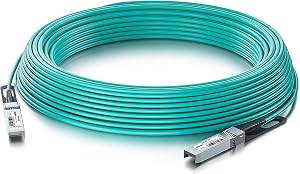
10G SFP+ AOC Cable - 10GbE SFP+ to SFP+ Active Optical Fiber Cable, OM3 MMF Direct-attach Fiber Assemblies with SFP+ connectors for Cisco SFP-10G-AOC50M, Ubiquiti UniFi, Supermicro, Mikrotik, 50-meter

A Pair of Gigabit SFP to RJ45 Converter, Fiber to Ethernet Media Converter with SFP Slot (Without Module), Plug & Play, 10/100/1000 Base-T Compatible, Auto-Negotiation & Jumbo Frame Support

electronics
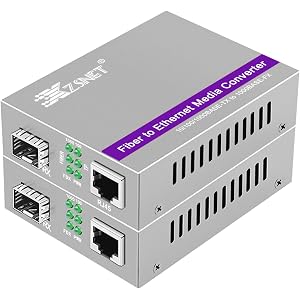
A Pair of Gigabit SFP to RJ45 Converter, Fiber to Ethernet Media Converter with SFP Slot (Without Module), Plug & Play, 10/100/1000 Base-T Compatible, Auto-Negotiation & Jumbo Frame Support

comments:

InvisiBillnet posted on r/homenetworking1w

I do have and use that Sodola switch. For an unmanaged 2.5GbE/10Gb SFP+ switch, I have no complaints about it. It's a very small form factor for an 8-port; the ports being so close together might be an issue in some setups. I also have a 10GbE/SFP+ switch of theirs. https://www.amazon.com/dp/B0D9GFQGD3/ They're generic "cheap stuff" but seem to be a good value so far. Keep in mind that name-brand stuff is also more likely to be locked to their own branded SFP modules. https://www.amazon.com/dp/B0GRCDJJTC/ is a "smart" (somewhat-managed) 5-port switch for not too much more. I picked one up because it was on sale and I wanted to add some more Omada stuff to my network. The 8-port version of that one (ES210X-M2) is $100. Pick your favorite brand and find one that has the ports to do what you want. 10Gb SFP+ isn't necessary in your case, but it is backward-compatible with SFP and will let you do multi-gig in the future, whereas SFP does limit you to 1Gb. 2.5GbE/SFP+ stuff doesn't cost that much more than 1GbE/SFP these days. I recently bought https://www.amazon.com/dp/B0C9Y6PWYC/ to run across my parents' yard but I haven't put it in yet, so I can't say a whole lot about it. https://www.amazon.com/dp/B0CKFDSB97/ appears to be the variant matching what you listed. Or https://www.amazon.com/dp/B0DSJB7TH8/ is another option. If you do end up needing branded SFP modules, I'd skip the random Amazon stuff and just get exactly what you need from FS. https://www.fs.com/c/50-25-10-1g-modules-57

belimawr123 posted on r/homenetworking1w

Once again, thank you so much for the advice folks! Today I finished double checking all my measurements and ordered the fiber 🤩. I decided to do one fiber run from the office to the basement (through external wall), add a managed PoE switch in the basement, then from it another run to the garages terminating on a managed PoE switch there. I ordered everything from Amazon: - 20m fiber: https://www.amazon.com/dp/B0CJXVQGJ9 - 50m fiber with pull eye: https://www.amazon.com/dp/B0C9Y6PWYC - 4 x TP-Link Omada SM5110-SR (SPF transciver) - 3 x TP-Link TL-SG2210P V3 managed PoE switches Any last minute advice? Once I get everything installed I'll make another post with the final setup and sharing the experience.

InvisiBillnet posted on r/homenetworking3w

In the pictured scenario, there's no performance difference between the two options. In both cases, all the devices are connected to the same switch, so they have full bandwidth to each other. They're all sharing the uplink from the switch to the ISP router, so any internet traffic could be bottlenecked by that uplink. The switch being a little further one way or the other makes no difference at all. If you remove all the red from your pic, the sameness of the topology becomes pretty visually obvious. In this case, it would be less effort and material to just run one cable between the house and garage. ------------------------- The difference would come into play when you have other switches/devices in the house (assuming all links are the same 1Gbps). https://i.imgur.com/w5XGA89.png is a slight variation of your scenario. In the first option there, all devices are plugged into the switch and have full bandwidth to each other without impacting the other devices on that switch. A PC in the garage could be doing a full 1Gbps file transfer to the PC in the house, while a second PC in the garage is using a full 1Gbps connection to the internet. The downside is having to run a cable the full distance to every PC - it becomes a lot more work and cable when you have dozens of In the second option, all the garage devices share a single link back to the house. Same situation as before: one garage PC is transferring files to the house PC and a second garage PC is accessing the internet. The combined traffic from the two garage PCs would have to share that single 1Gb link between the switches. Each connection would get an average of 500Mbps if they were going simultaneously. If the third and fourth garage PCs were also trying to get to the internet, each garage PC would end up with an average of 250Mbps. The third option shows using switches with a dedicated uplink port, like https://www.amazon.com/dp/B0G19C3F48/ In this case, you still have a single physical connection between the house and the garage, but it's 10Gbps via the SFP+ ports rather than standard 1GbE. All the garage PCs are still sharing that single uplink just like in #2, but since the uplink is 10Gb, it has enough room to carry 1Gb (or even 2.5Gb) from each of the four garage PCs simultaneously. ------------------------- If you're actually running a connection to the garage, look into fiber instead of copper. It will avoid the potential lightning and grounding issues of using conductive wire between two separate buildings. It also has the benefit, when combined with switches like the link above, of supporting a faster uplink between the locations. (Option 3 in my pic) Depending on the install details, you could get direct-burial fiber like https://www.amazon.com/dp/B0C9Y6PWYC/ or a complete SFP-to-SFP AOC cable like https://www.amazon.com/dp/B0BJDFMG8S/ if you have a nice sealed conduit. If the cable install is a pain, run a second one now like others have said. Putting a spare in along with the main should be a negligible difference in work now vs. having to redo all this again if there's a problem in a year. If you have a nice clean conduit with a pullstring and it's a breeze to run a new one, then don't worry about installing a spare right now.

InvisiBillnet posted on r/homenetworking3w

Look into media converters or switches with SFP ports to run fiber to the garage instead of copper. It will eliminate the potential grounding and lightning issues associated with a conductive cable (assuming the garage has power). I recently bought https://www.amazon.com/dp/B0C9Y6PWYC/ and plan to run it across my parents' yard in the near future.

InvisiBillnet posted on r/homenetworking6w

This sounds almost identical to my dad's workshop setup. Currently, we have an Asus AiMesh router sitting in the shop window, with wireless backhaul to the other routers in the house, and rebroadcasting Wi-Fi inside the shop. If I move the router to either side of the window, behind the metal siding, it gets no signal at all. I'm working on a plan to run fiber (something like https://www.amazon.com/gp/product/B0C9Y6PWYC/ ) out to the shop, so the router can be placed in a more central location instead of needing to sit in the window for backhaul. I have a pair of media converters ( https://www.amazon.com/dp/B0D1CK56VR/ ) that I'm not using, so the basic plan is to just convert the 1GbE in the house to fiber, run it across the yard, then convert it back to 1GbE to plug into the Asus out in the shop. Fiber is preferred over copper in these situations because it eliminates ground issues between the two buildings and is immune to lightning issues outside.