PPC 2520A GLP-1G70CWWS MoCA 'POE' Coax Filter Cable TV Eliminate Multi-Room DVR Interference & Modem - New Version

PPC 2520A GLP-1G70CWWS MoCA 'POE' Coax Filter Cable TV Eliminate Multi-Room DVR Interference & Modem - New Version

similar products:

2 Way Antronix MMC1002H-B 5-1675 MHz MoCA 2.0 Splitter for Frontier Formerly Verizon Fios

electronics

2 Way Antronix MMC1002H-B 5-1675 MHz MoCA 2.0 Splitter for Frontier Formerly Verizon Fios

Amphenol 8-Way Digital Splitter MoCA 2.5 ABS318H, Silver

electronics

Amphenol 8-Way Digital Splitter MoCA 2.5 ABS318H, Silver

Amphenol 3-Way Digital Coaxial Splitter MoCA 2.5 ABS313H

electronics

Amphenol 3-Way Digital Coaxial Splitter MoCA 2.5 ABS313H

Amphenol 3-Way Digital Coaxial Splitter MoCA 2.5 ABS313H

electronics

Amphenol 3-Way Digital Coaxial Splitter MoCA 2.5 ABS313H

Amphenol 3-Way Digital Coaxial Splitter MoCA 2.5 ABS313H

electronics

Amphenol 3-Way Digital Coaxial Splitter MoCA 2.5 ABS313H

Amphenol 3-Way Digital Coaxial Splitter MoCA 2.5 ABS313H

electronics

Amphenol 3-Way Digital Coaxial Splitter MoCA 2.5 ABS313H

Amphenol 3-Way Digital Coaxial Splitter MoCA 2.5 ABS313H

electronics

Amphenol 3-Way Digital Coaxial Splitter MoCA 2.5 ABS313H

NEWCARE Digital 4-Way Coaxial Cable Splitter 5-2400MHz, RG6 and RG59 Compatible,4 Port Coax Splitter for Satellite, Cable TV, Antenna System, High Speed Internet and MoCA Network

NEWCARE Digital 4-Way Coaxial Cable Splitter 5-2400MHz, RG6 and RG59 Compatible,4 Port Coax Splitter for Satellite, Cable TV, Antenna System, High Speed Internet and MoCA Network

BAMF 2-Way Coax Cable Splitter, Bi-Directional MoCA 5-2300MHz – High-Performance Splitter for TV, Internet, or Satellite

BAMF 2-Way Coax Cable Splitter, Bi-Directional MoCA 5-2300MHz – High-Performance Splitter for TV, Internet, or Satellite

Amphenol 8-Way Digital Splitter MoCA 2.5 ABS318H, Silver

electronics

Amphenol 8-Way Digital Splitter MoCA 2.5 ABS318H, Silver

MoCA 2.5 Adapter Kit with 2.5G Ethernet Port and PoE+ 30W for Ethernet Over Coax – Ideal for Wi-Fi 6E/7 Access Points, IP Cameras, and More – Model KB-M3-03

electronics

MoCA 2.5 Adapter Kit with 2.5G Ethernet Port and PoE+ 30W for Ethernet Over Coax – Ideal for Wi-Fi 6E/7 Access Points, IP Cameras, and More – Model KB-M3-03

Amphenol 2-Way Digital Coaxial Splitter MoCA 2.5 ABS312H

electronics

Amphenol 2-Way Digital Coaxial Splitter MoCA 2.5 ABS312H

Amphenol 8-Way Digital Splitter MoCA 2.5 ABS318H, Silver

electronics

Amphenol 8-Way Digital Splitter MoCA 2.5 ABS318H, Silver

Amphenol 8-Way Digital Splitter MoCA 2.5 ABS318H, Silver

electronics

Amphenol 8-Way Digital Splitter MoCA 2.5 ABS318H, Silver

Amphenol 8-Way Digital Splitter MoCA 2.5 ABS318H, Silver

electronics

Amphenol 8-Way Digital Splitter MoCA 2.5 ABS318H, Silver

RG6 Compression Tool Coax Cable Crimper Kit RG6 RG11 RG59 F81 with 20PCS F Compression Connectors - BlueYellow

tools, home

RG6 Compression Tool Coax Cable Crimper Kit RG6 RG11 RG59 F81 with 20PCS F Compression Connectors - BlueYellow

Amphenol 8-Way Digital Splitter MoCA 2.5 ABS318H, Silver

electronics

Amphenol 8-Way Digital Splitter MoCA 2.5 ABS318H, Silver

goCoax MoCA 2.5 Adapter (2-Pack) with 2.5GbE Ethernet Port | MA2500D Ethernet Over Coax for Gaming & 4K Streaming | 2.5Gbps, Plug and Play | for Cable Internet Homes - Not for Satellite TV (White)

electronics
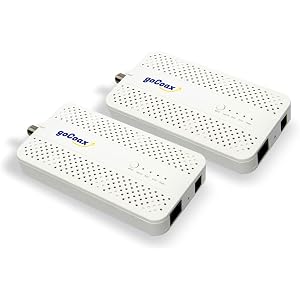
goCoax MoCA 2.5 Adapter (2-Pack) with 2.5GbE Ethernet Port | MA2500D Ethernet Over Coax for Gaming & 4K Streaming | 2.5Gbps, Plug and Play | for Cable Internet Homes - Not for Satellite TV (White)

MoCA 2.5 Adapter Kit with 2.5G Ethernet Port and PoE+ 30W for Ethernet Over Coax – Ideal for Wi-Fi 6E/7 Access Points, IP Cameras, and More – Model KB-M3-03

electronics

MoCA 2.5 Adapter Kit with 2.5G Ethernet Port and PoE+ 30W for Ethernet Over Coax – Ideal for Wi-Fi 6E/7 Access Points, IP Cameras, and More – Model KB-M3-03

Amphenol 8-Way Digital Splitter MoCA 2.5 ABS318H, Silver

electronics

Amphenol 8-Way Digital Splitter MoCA 2.5 ABS318H, Silver

goCoax MoCA 2.5 Adapter (2-Pack) with 2.5GbE Ethernet Port | MA2500D Ethernet Over Coax for Gaming & 4K Streaming | 2.5Gbps, Plug and Play | for Cable Internet Homes - Not for Satellite TV (White)

electronics

goCoax MoCA 2.5 Adapter (2-Pack) with 2.5GbE Ethernet Port | MA2500D Ethernet Over Coax for Gaming & 4K Streaming | 2.5Gbps, Plug and Play | for Cable Internet Homes - Not for Satellite TV (White)

Coaxial(Coax) Tester Portable BNC RJ59 and F-Style RJ45 Ethernet CAT5/CAT6/Coax Continuity Cable Tester Wire Checker Tool,with F Female Adapters

tools
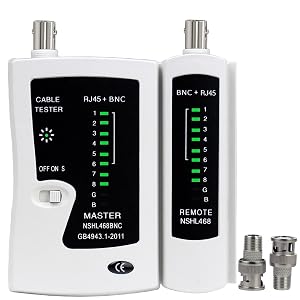
Coaxial(Coax) Tester Portable BNC RJ59 and F-Style RJ45 Ethernet CAT5/CAT6/Coax Continuity Cable Tester Wire Checker Tool,with F Female Adapters

Amphenol 8-Way Digital Splitter MoCA 2.5 ABS318H, Silver

electronics

Amphenol 8-Way Digital Splitter MoCA 2.5 ABS318H, Silver

goCoax MoCA 2.5 Adapter (2-Pack) with 2.5GbE Ethernet Port | MA2500D Ethernet Over Coax for Gaming & 4K Streaming | 2.5Gbps, Plug and Play | for Cable Internet Homes - Not for Satellite TV (White)

electronics

goCoax MoCA 2.5 Adapter (2-Pack) with 2.5GbE Ethernet Port | MA2500D Ethernet Over Coax for Gaming & 4K Streaming | 2.5Gbps, Plug and Play | for Cable Internet Homes - Not for Satellite TV (White)

Coaxial(Coax) Tester Portable BNC RJ59 and F-Style RJ45 Ethernet CAT5/CAT6/Coax Continuity Cable Tester Wire Checker Tool,with F Female Adapters

tools

Coaxial(Coax) Tester Portable BNC RJ59 and F-Style RJ45 Ethernet CAT5/CAT6/Coax Continuity Cable Tester Wire Checker Tool,with F Female Adapters

comments:

plooger posted on r/homenetworking2d

Alternatives (depicted using generic topologies) ... using gateway built-in MoCA LAN bridge using standalone adapter as main bridge--- isolated ISP/modem feed Related: MoCA-capable gateway considerations outline/highlights for a shared cable+MoCA setup MoCA adapters, grouped by throughput MoCA-compatible splitter recommendations (… and warnings) preferred MoCA filter: PPC GLP-1G70CWWS (Amazon US listing) … 70+ dB stop-band attenuation, spec’d for full MoCA Ext. Band D range, 1125-1675 MHz

plooger posted on r/techadvice3d

Alternatives: using gateway built-in MoCA LAN bridge using standalone adapter as main bridge Related: MoCA-capable gateway considerations outline/highlights for a shared cable+MoCA setup MoCA adapters, grouped by throughput MoCA-compatible splitter recommendations (… and warnings) preferred MoCA filter: PPC GLP-1G70CWWS (Amazon US listing) … 70+ dB stop-band attenuation, spec’d for full MoCA Ext. Band D range, 1125-1675 MHz

plooger posted on r/homenetworking5d

Recommended: MoCA-compatible splitter recommendations (… and warnings) preferred MoCA filter: PPC GLP-1G70CWWS (Amazon US listing) … 70+ dB stop-band attenuation, spec’d for full MoCA Ext. Band D range, 1125-1675 MHz MoCA project costs can be trimmed by using Frontier FCA252 MoCA 2.5 adapters, still available for $24 per via eBay. MoCA adapters, grouped by throughput

TomRILReddit posted on r/homenetworking6d

Add the following in the outside box. POE filter screws to the input port of splitter. You can add a larger splitter if you want to activate more outlets with moca. You'll need to add a 2-way splitter at the wall outlet at the gateway. One output port to the gateway and 2nd port to moca adapter. Get a 2nd POE filter for the gateway coax, attaching it to the splitter output port to the gateway (preventive) Moca adapter Gocoax.com POE filter https://www.amazon.com/GLP-1G70CWWS-Filter-Eliminate-Multi-Room-Interference/dp/B08HJ4F4D4/ 2-way splitter https://a.co/d/7Uc89vM RG-6 Coax Patch Cable, ~1ft long Get 2 pcs for interconnecting new parts.

Smorgas47 posted on r/homenetworking1w

Yes, MoCA adapters will do the trick. If you have a DOCSIS 3.1 modem, here is a diagram that shows how to hook things up. Make sure you use 5-1675mhz splitters and 70b MoCA (PoE) filters.

plooger posted on r/techsupport1w

When I plug the coax source into the tee I split it one to the adapter and one to the modem. What is the specific component that you’re referring to as “the tee”? (You’d want this to be a MoCA-optimized 2-way coax splitter.) MoCA-compatible splitter recommendations (… and warnings) The critical bit skipped over is whether and how the two coax outlets interconnect. You’ll need to locate the coax junction (from which point the coax lines running to your outlets originate) to ensure that the needed coax lines are interconnected through a MoCA-compatible component and to ensure that your coax plant is secured behind a 70+ dB “PoE” MoCA filter. preferred MoCA filter: PPC GLP-1G70CWWS (Amazon US listing) … 70+ dB stop-band attenuation, spec’d for full MoCA Ext. Band D range, 1125-1675 MHz More background/detail on MoCA >here<. One example topology pulled from the above link, for a very simple shared cable+MoCA setup: https://i.imgur.com/cthKykB.png I don’t even know if this is the right sub for this question. Re-/cross-post to r/HomeNetworking, if needed.

plooger posted on r/homenetworking1w

You might also order a 70+ dB MoCA filter, to install on the G1100 to block any possible MoCA LAN interference. (Disabling the G1100’s MoCA LAN is necessary and recommended, but the filter would provide insurance.) So, with the G1100 built-in MoCA LAN bridge disabled/blocked, you’d install a MoCA-compatible 2-way splitter at the G1100 to get both the G1100 and the new MoCA 2.5 adapter wired to the coax wall outlet. And you’d then connect the MoCA adapter via an Ethernet patch cable to a LAN port on the G1100. Then fingers crossed that the ECB5240M or the other new MoCA 2.5 adapter can link-up from the basement location. MoCA-compatible splitter recommendations (… and warnings) preferred MoCA filter: PPC GLP-1G70CWWS (Amazon US listing) … 70+ dB stop-band attenuation, spec’d for full MoCA Ext. Band D range, 1125-1675 MHz

plooger posted on r/comcast_xfinity1w

Otherwise, suggestions for the pictured topology/components would be to upgrade both splitters to MoCA-optimized models, and get a 70+ dB “PoE” MoCA filter installed on the input port of the 2-way splitter. MoCA-compatible splitter recommendations (… and warnings) preferred MoCA filter: PPC GLP-1G70CWWS (Amazon US listing) … 70+ dB stop-band attenuation, spec’d for full MoCA Ext. Band D range, 1125-1675 MHz

Smorgas47 posted on r/homenetworking1w

Do you by chance have coax so you could use MoCA adapters to get a wired connection? Here is a diagram that shows how to use MoCA with DOCSIS 3.1 modems. Be sure to use 5-1675mhz splitters and 70 db MoCA (PoE) filters.

Smorgas47 posted on r/homenetworking1w

Here is a diagram that shows how to use MoCA with DOCSIS 3.1 modems. Be sure to use 5-1675mhz splitters and 70 db MoCA (PoE) filters. The filter in your cart looks to be 70db, and that Screenbeam looks good too. I have the Kiwee MoCA adapters and they are wonderful. If you can trace your coax cables and make the connections as shown in the diagram you should be good to go.

Smorgas47 posted on r/homenetworking1w

Here is a diagram that shows how to use MoCA with DOCSIS 3.1 modems. Be sure to use 5-1675mhz splitters and 70 db MoCA (PoE) filters. The filter in your cart looks to be 70db, and that Screenbeam looks good too. I have the Kiwee MoCA adapters and they are wonderful.

Smorgas47 posted on r/homenetworking1w

Here is a diagram that shows how to use MoCA with DOCSIS 3.1 modems. Be sure to use 5-1675mhz splitters and 70 db MoCA (PoE) filters.

Smorgas47 posted on r/homenetworking2w

Here is a diagram that shows how to use MoCA with DOCSIS 3.1 modems. Be sure to use 5-1675mhz splitters and 70 db MoCA (PoE) filters. The filter at the house entrance keeps MoCA from your neighbors and the one at the modem's coax input keeps the MoCA signal from interfering with the DOCSIS 3.1 signal going to the modem.

PeterC18st posted on r/homenetworking2w

Another thing you will need to do is get a Moca filter to the coax entry point into your home from the street and place it there. It’ll stop you from sending Moca to the entire neighborhood causing issues for your neighbors. If you have any other splitters in the house you’ll need to switch those out too. In my house we need an amplif to help get strong signal to the entire house for all the drops. If you don’t have one then don’t worry about it. Ours was installed by the cable company many years ago. I have a Moca setup myself. https://a.co/d/03mlKCSt filter https://a.co/d/03tBN6td 4way splitter https://a.co/d/0b8lFnG2 2 way splitter

Smorgas47 posted on r/homenetworking2w

Get one from this set: https://www.amazon.com/dp/B09JSK7WD6 Proper splitters are 5-1675mhz. If you happen to have a DOCSIS 3.1 cable modem setup, here is the diagram that shows how to set that up correctly: https://i.imgur.com/LzBSyrl.png Use 70db MoCA filters where specified. https://www.amazon.com/dp/B08HJ4F4D4 MoCA (PoE) filters block MoCA signals, one so that your MoCA signal doesn't reach the neighbors and the other so that the MoCA signal doesn't interfere with the DOCSIS signal going to your modem which is 5-1005mhz band.

Smorgas47 posted on r/homenetworking2w

Here is a diagram that shows how MoCA works with DOCSIS 3.1 modems. Splitters should be 5-1675mhz and MoCA filters should be 70db. Looks like you can replace that 3 way with a 2 way and add a 2 way in the box per the diagram and have MoCA and TV to all three rooms. So Router / modem in one room on one line and the other 2 going to the additional rooms. I like the Kiwee MoCA adapters that have PoE+ ethernet port.

Smorgas47 posted on r/homenetworking3w

Here is a diagram showing how MoCA works with DOCSIS 3.1 modems. I would get rid of that powered splitter and replace it with a 5-1675mhz splitter that supports MoCA. Since MoCA is bi directional and the amplified splitter only amplifies in one direction, it might be the problem. Also get 70db MoCA (PoE) filters and install them as shown on the diagram. Get splitters that meet the need as shown in the diagram with only the number of ports necessary.

Smorgas47 posted on r/homenetworking4w

Here is a diagram that shows how to use MoCA adapters for DOCSIS 3.1 modem systems. Be sure that splitters are 5-1675mhz for optimum MoCA throughput and ensure you use 70db MoCA (PoE) filters. You can also use a single run of coax using 2 MoCA adapters without needing and splitters or filters. You might need to use F81 barrel connectors to take 2 pieces of coax and turn it into a single run.

Smorgas47 posted on r/homenetworking8w

Option number 2 is what you want to go with. Replace the amplifier with a 5-1675mhz splitters and use 70db MoCA filters if needed for best results. If you have cable Internet with DOCSIS 3.1 modem and it uses part of the coax you plan to use with MoCA you might want to look at this diagram that shows the connections. The problem with the amplifier is that it ups the signal strength in one direction but not the other. MoCA is bi directional since the devices need to talk to each other. .... and while those coax connectors look like they have crappy connections, if they are tight and the connector doesn't fall off they should be good for now, but I would look into getting compression fittings and compression tool to fix them in the future.

Smorgas47 posted on r/homenetworking8w

Since you have the coax, here is a diagram that shows how to use MoCA adapters with DOCSIS 3.1 modems. Be sure to use 5-1675mhz splitters and 70db MoCA filters for best results. GoCoax and Kiwee MoCA adapters sold at Amazon are good choices. The referenced Kiwee model has PoE+ Ethernet port. I use that Kiwee model to connect a Unifi U7 In-Wall AP using the PoE+ and then connect a Flex Mini 2.5 switch that is powered by the PoE port on the AP. My system is all UniFi.

Smorgas47 posted on r/homenetworking9w

If you have coax you might want to use that for the backhaul of your satellite WiFi APs. Here is a diagram that shows how MoCA adapters are used with DOCSIS 3.1 modems. Be sure to use 5-1675mhz splitters and 70db MoCA filters. These GoCoax MoCA adapaters should work well for you. The diagram covers the most technically complex situation requiring MoCA filters to keep the signal from your neighbors as well as to keep the MoCA signal from interfering with the DOCSIS modem signal. Adjust your connections accordingly. This is the cheapest tester for mapping your coax. Connect the sending unit in the room and connect the receiving unit to the various possibilities until it lights up. Also useful for Ethernet cables.

Smorgas47 posted on r/homenetworking9w

Here is a diagram that shows how MoCA adapters are used with DOCSIS 3.1 modems. Be sure to use 5-1675mhz splitters and 70db MoCA filters. These GoCoax MoCA adapaters should work well for you. The diagram covers the most technically complex situation requiring MoCA filters to keep the signal from your neighbors as well as to keep the MoCA signal from interfering with the DOCSIS modem signal. Adjust your connections accordingly. This is the cheapest tester for mapping your coax. Connect the sending unit in the room and connect the receiving unit to the various possibilities until it lights up. Also useful for Ethernet cables.