AV Access USB Over Ethernet Extender Kit, USB 2.0 480Mbps, 4-Port Hub, USB Over CAT5e/CAT6/CAT7 Up to 60m/196ft for Webcam, KVM, Printer, PC, Plug & Play, No Driver, Compatible with Mac Windows Linux

AV Access USB Over Ethernet Extender Kit, USB 2.0 480Mbps, 4-Port Hub, USB Over CAT5e/CAT6/CAT7 Up to 60m/196ft for Webcam, KVM, Printer, PC, Plug & Play, No Driver, Compatible with Mac Windows Linux

similar products:

comments:

vandridine posted on r/steammachine1w

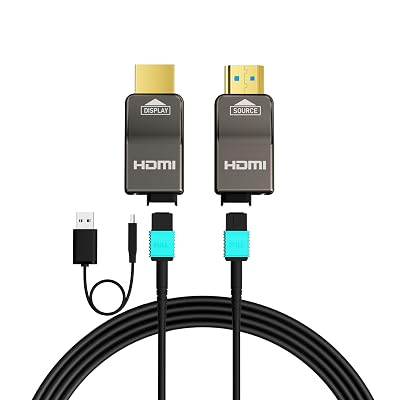
HDMI Cable: https://www.amazon.com/RUIPRO-Dynamic-Flexible-Projector-Theatre/dp/B081SQXPWB/ref=sxin_28_sbv_search_btf?content-id=amzn1.sym.c8b39f81-ded8-4d75-80c2-6dfa03cbb699%3Aamzn1.sym.c8b39f81-ded8-4d75-80c2-6dfa03cbb699&cv_ct_cx=fiber%2Boptic%2Bhdmi&keywords=fiber%2Boptic%2Bhdmi&pd_rd_i=B081SQXPWB&pd_rd_r=9207db7f-8002-4cc9-bbd3-5a02a3add6f5&pd_rd_w=kyv8L&pd_rd_wg=HgwCB&pf_rd_p=c8b39f81-ded8-4d75-80c2-6dfa03cbb699&pf_rd_r=75SQZD6SXJ7RXKG6Y34X&qid=1782160895&sbo=RZvfv%2F%2FHxDF%2BO5021pAnSA%3D%3D&sr=1-1-5190daf0-67e3-427c-bea6-c72c1df98776&th=1 USB over ethernet adaptor: https://www.amazon.com/AV-Access-Extender-Operating-Synchronously/dp/B01EV33R8S/ref=sr_1_1_sspa?crid=J1KVZTU7XBC3&dib=eyJ2IjoiMSJ9.4aJNDCnYjs0PiN-Qhu8hXO6D4s9jc01TvUHZrmufFAidYV28SnGMN9pTYvk_NkqagP3zs05lB1grcI1axFcUdRUgAgE930LaPW9Z907ZMHRL5J4F62Cz1zvJDrnkf59OtvZVXQYn9ijAtTo8RQfY3t5DcXagyq6yaH1BMBk3n9U4UBV-XKjnprgv-o4yGwj04KxhCL4-NEtEpEFckafYDJrlvy-gp5PjcKpFx2iuJzw.1M7UM7gSob_8_8UjdEOhoqWhMZXCKJjZRzWw0Fv0CsE&dib_tag=se&keywords=usb%2Bover%2Bethernet&qid=1782161064&sprefix=USB%2Bover%2Be%2Caps%2C156&sr=8-1-spons&sp_csd=d2lkZ2V0TmFtZT1zcF9hdGY&th=1 The HDMI cable can output 4k 120hz + 10 bit color + HDR with no drop in image quality. USB over ethernet does not cause any additional lag, I have played dota 2 and CS using the adaptor, it is pretty flawless. I ran a 100' HDMI cable and 100' Cat 6e ethernet cable from my upstairs office to the downstairs living room. I use display fusion to manage monitor and sound profiles, it allows you to save monitor resolution, HZ, bit rate, and sound output. One profile is setup for my desktop monitors/desktop speakers. Second profile is set to my TV/TV speakers. I also have a third profile for my sim rig. I keep a wireless xbox controller and a wireless keyboard/trackpad in my living room. With this setup, I can be downstairs in my living room, click CTR+ALT+F10 (keybind in display fusion for my TV profile), and within a few seconds it disconnects the desktop monitors and sets the video/sound output to the TV... you don't even have to get off the couch. I have been using this setup for about 4 years now and it works great.

michrech posted on r/homenetworking4w

I ran cabling for this purpose. I'm using a standard Cat5 ethernet cable with this USB extender for keyboard/mouse. I installed this 50' optical DP cable for video / audio. I connect a 3.5mm audio cable from the back of my Innocn 34Q1R OLED monitor to my speakers. The computer lives in the closet to my spare bedroom. I ran both cables up the wall (it's an interior wall, so there was no insulation) into the attic, across the house, and down another interior wall to where my monitor / keyboard / mouse live. A friend of mine that claims to be able to tell the difference when display settings change / difference between different refresh rates insisted the PC was actually in my computer desk, installed where the desk drawers are. The monitor is at 3440x1440@175Hz using the afore linked cable and an nVidia 4060ti. I've been running a similar setup for 9 years now -- same USB extender, though prior to using the optical DP cable, I had a 50' RapidRun HDMI cable. I've been using the optical DP cable for 2 years now. Other than the connector at the PC side being warm, I've had no issues with it. I don't play FPS-type games, but I have been playing Diablo 4, The Last Caretaker, StarRupture, etc without issue. IF the USB extender is adding any input lag, I can't tell, nor can my friend who is allegedly super-sensitive to such things... lol

pagusas posted on r/pcmasterrace5w

So I do exactly this, I have my Office 5090 machine also running to my living room 85" screen. I use a 150ft hdmi 2.1 fiber optic cable, works perfectly *Gsync and everything*. Protip, get a powered cable so you can setup a smart switch to kill the power to it, that will allow you to disable the living room feed with a smart home system *I use homekit + Home assistant and program it with my sofaboton, so turning on the HTPC switch will power the fiber hdmi cable, alerting windows to switch screens and turn off my office screen, works great and way better than a software solution* Buy this fiber cable: amazon.com/dp/B0DZ27HKPK?ref_=ppx_hzsearch_conn_dt_b_fed_asin_title_3 They support both HDMI and Displayport swappable ends, and its super easy to pull through the attic. Do not buy the cables that have premade ends on them. Regarding hdmi or displayport, with the cable I'm recommended you could buy either (I use HDMI) amazon.com/dp/B01EV33R8S?ref_=ppx_hzsearch_conn_dt_b_fed_asin_title_14 this is the USB over ethernet system I use, and its work reliably for 8 years. Highly recommended. Your audio will be carried on via HDMI (or displayport) on the fiber run.