Deal4GO 2.5" SATA Hard Drive Cable SSD Connector Adapter for Dell Latitude 5580 5590 5591 Precision 3520 3530 CDM80 HDD Cable DC02C00EO00 6NVFT 06NVFT

Deal4GO 2.5" SATA Hard Drive Cable SSD Connector Adapter for Dell Latitude 5580 5590 5591 Precision 3520 3530 CDM80 HDD Cable DC02C00EO00 6NVFT 06NVFT

similar products:

comments:

MontagneHomme posted on r/homeserver14w

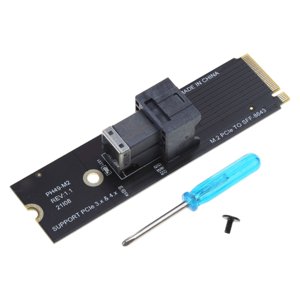
Ok. Start with a cheap laptop, make sure you can get 4 or more SATA drives going over PCIe in addition to the boot drive, and make sure you have power for it all... Oh look, here's one for $90 that has an Intel i7-1185G7 CPU. Comes with a 256GB boot M.2, 8GB DDR4, built in UPS, keyboard, display... lovely. Here are the things I really look for: Intel CPU that supports QSV a spare PCIe slot with enough lanes for 4 SATA6 drives (e.g. PCIe gen3 x2 can just about handle 4 SATA6 drives without issue) I prefer USB-C power, but if it's one with an available barrel jack adapter or the like then that works too Now that you have a foundation, let's plan the rest of it. This one doesn't just have a spare M.2 slot we could cram one of these adapters into and move on... but it does support M.2 PCIe and has a SATA drive slot. And lo, a community write up exists for how to get two drives going. So our plan becomes using this SATA slot for a boot drive and breaking out the M.2 to our storage pool SATA drives. Per the guide, we need Used laptop: $90 6NVFT cable: $9 Half-size SATA to M.2 SATA board: 2pcs for $10 M.2 to SFF-8643: $11 SFF-8643 to 4 SATA cable: $20 SATA power adapter: $20 SATA power splitter cable: $6 You'll need a M.2 SATA boot drive and some SATA storage HDDs. While it would be best to spend ~$20 more on a frame for the drives that allows to you ziptie a fan for cooling them off when you hit them hard, it's not strictly necessary. Once you get the drives installed, I suggest installing TrueNAS SCALE on the M.2 SATA board as the boot drive, configure the storage drives for ZRAID1 and start configuring your network share config and such. Good times ahead! Oh right, our budget. So let's see: $166. I wonder how that compares to the pre-built NAS you imagined? The one I see recommended right now is the UGREEN DXP4800 Plus. It also supports 4 drives. DXP4800 Plus DIY budget NAS Winner CPU Intel Pentium Gold 8505 i7-1185G7 DIY. +3% speed, -50% power consumption at load... same at idle. lol. RAM 8GB DDR45, exp. to 64GB (1x64) @ 4800MHz 8GB DDR4, exp. to 32GB (2x16) @ 2400MHz DXP. Undoubtedly. This would matter for VMs or container workloads, but isn't really noticeable otherwise. GPU Iris Xe graphics (48 EUs) Iris Xe graphics (96 EUs) DIY... by DOUBLE the EUs... and half the power...lol. Storage capacity 136TB, 4x SATA ...more, I suspect. Draw, since I'm not sure. Seems an arbitrary limit from UGREEN to be honest. Networking 1x2.5Gb, 1x10Gb 1x1Gb Definitely goes to DXP on paper, but in reality if your network supports 10Gb you'd likely already have a NAS or have different expectations of one. For those with 1 or 2.5Gb networking, this is a wash. Just spend $15 on a 2.5Gb USB NIC if needed. "...and most importantly, cost" $620 $166 DIY... by ~73% reduction in cost. Missing out anything else? Well... yes. I'd really like to dedicate a drive for ZFS Cache... and because losing your ZFS Cache means you'd lose your data pool, it needs to be in RAID configuration for drive redundancy. It looks like you CAN do that with the DXP. It's not worth the other trade offs though to be honest. What if wanted more than 4 drives? Then DIY is absurdly better. There are plenty of writeups on those builds, though. Here's one from about a year ago that beats UGREEN's 8 bay offering for almost half the price: https://zitseng.com/archives/24777 And my favorite part about these is that they're entirely, completely void of proprietary software and hardware. There's no vendor lock-in... you can replace/repair any component as you see fit. Don't even get me started on Synology's drive lock-in....